Shared Compression Dictionary Shenanigans
Honey, I Shrunk The HTML
A lot of web performance advice boils down to "what can we reuse?"
With caching, we reuse previously downloaded resources. SPAs (Single-Page Applications) go as far as to "reuse" the entire document across navigations, swapping out sections of the DOM. Streaming service-workers and edge-workers reuse shared pieces of HTML, like global headers and footers, only going to the origin server for dynamic parts, and stitching this all together into a single response. This is often termed "app-shell" architecture - the "shell" being those static pieces shared across pages:

App-shells (the HTML-first streaming ones) are interesting. You get many of the benefits of an SPA - snappy navigations, "client-side" rendering - without the baggage. But they're still pretty complex. You need to expose the static HTML partials for shared pieces of content (header/footer) so that they can be independently cached, as well as the dynamic HTML that gets sandwiched in between. This is in addition to serving the full page from your server for non-Service/Edge-worker handled page loads. Then you'll also need to merge the response streams of all the disparate pieces (header, dynamic content, footer) into a single response that's piped to the client.
Phew! Not impossible, and definitely underused, but with significant considerations regarding architecture and the like. Is there a simpler way to "reuse" HTML shared across pages and get the performance benefits without the same overhead?
Shared Compression Dictionaries
This is a relatively new, as of now Chromium-only browser feature.
Shared compression dictionaries allow us to drastically reduce the size of resources compared to regular compression, especially when it comes to files with lots of shared content. Standard Brotli compression can give savings of up to 70%; shared compression dictionaries can increase this to 90-98%+.
Compression algorithms work on text-files by identifying common strings, shrinking these into much smaller tokens, and associating the two via a dictionary. This greatly reduces what needs to be sent over the wire. The resultant compressed content is then decompressed to its original size on the client.
Shared compression dictionaries take this a step further. By defining your own dictionaries for compression - using strings common across files - compression can be turbo-charged. This takes two forms:
- Static, or delta compression, for compression across versions of the same file. A previous version of a file is used as the dictionary to compress the new version. This is effective because file content rarely changes much between versions, so the delta is often small.
- Dynamic compression, for compressing different resources with a lot of shared content - say, a series of pages with the same header and footer (an app-shell!).
It's the latter I'll be focusing on today. The beauty of this form of "app-shell architecture" (if you can call it that) compared to say, an SPA or a streaming edge/service-worker, is that the complexity is (almost) entirely scoped to the server. The extraction of mutual HTML into a shared dictionary can also be automated, and done ahead of time during the build-step.
How does it work then?
I'll start with a simple E-Commerce demo site (original, I know) as our foundation. Here's a few of the product pages:
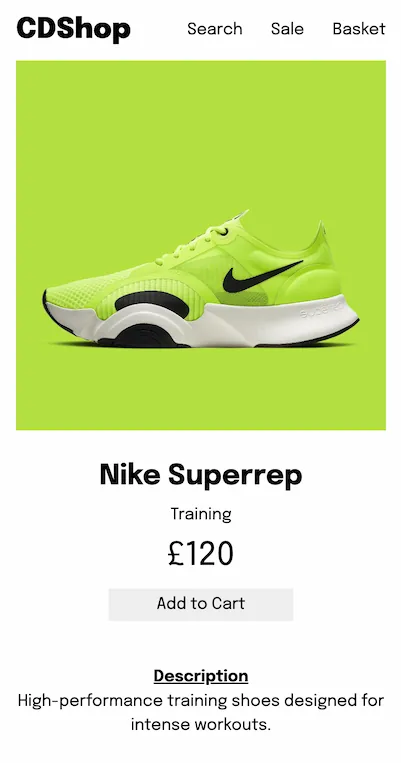

These look like great candidates for shared-dictionary compression. The document structure itself is essentially identical, and you'll notice how little of the page is truly dynamic: the image source, and a few text strings. Everything else can be very effectively compressed out.
How?
Creating A Dictionary
First off, we need a shared-dictionary to compress the files with. This use-as-dictionary tool can do that for you; just provide the URLs of the pages and it'll give you a dictionary. But it's also very easy to do this manually, or as part of your existing built-step. The goal is just to get common strings into a plain-text file that can then be used by Brotli or Zstd to compress with.
In my case, I'm building product pages from a shared template, so why not just use
that? It's as simple as emitting a dict.dat file using the
product-page template with an empty product:
await fs.writeFile("dist/dict.dat", buildProductPage({}));Dictionary-compressing
Next up, we need to use the dictionary to compress our files. This can in principle be done at runtime (Patrick Meenan has an example of that using a Cloudflare Worker) - but I'm keeping it simple and compressing ahead of time, as part of the build step. If you're doing any request-time rendering, runtime compression might be more valuable, but in our case we're already static!
Post-build, using the Brotli CLI and our generated dictionary, we can create dictionary-compressed versions of the product-pages:
files=$(find dist/products -type f -name "*.html")

for file in $files; do
  brotli --stdout -D dist/dict.dat "$file" >>"$file.br"
done
Running brotli -D with a provided dictionary as the first argument
(dict.dat in this case), and a file to compress as the second, will
output a dictionary-compressed version of that file.
We also need 2 additional things in the header of our Dictionary-Compressed Brotli files for the browser to properly interpret them:
-
A DCB "magic number", consisting of 4 fixed bytes:
0xff, 0x44, 0x43, 0x42(the latter 3 corresponding to DCB in ASCII). - The SHA256 hash digest of our dictionary.
This can easily be added to the script:
files=$(find dist/products -type f -name "*.html")
digest=$(openssl dgst -sha256 -binary dist/dict.dat)

for file in $files; do
  echo -en '\xffDCB' >"$file.br"
  echo -n "$digest" >>"$file.br"
  brotli --stdout -D dist/dict.dat "$file" >>"$file.br"
done
Don't forget this! (I did)
Dictionary-decompressing
OK, now we've got our dictionary-compressed pages ready to go! Unfortunately
though, on it's own, the browser has no way of decompressing these
.html.br files, so if you try to send them as is it won't work. The
browser needs the dictionary we used for compression in order to reverse
- i.e. decompress - our pages.
We can send this shared-dictionary to the client through a link tag:
<link rel="compression-dictionary" href="/dict.dat" />Or, to make things slightly easier, with a Link header:
Link: </dict.dat>; rel="compression-dictionary"
The dict.dat file must also be served with a
Use-As-Dictionary header, and relevant directive:
Use-As-Dictionary: match="/products/*"The above tells the browser "only use the provided dictionary to decompress files matching this path"- in our case, product pages!
Never trust the client
One last thing (I promise) - after the browser downloads the specified dictionary
(from the <link> tag or Link header), it will send
an Available-Dictionary header for every subsequent matching request,
with the dictionary hash as its value. We need to check this hash matches the hash
of the dictionary on our server before sending the dictionary-compressed response.
That's fairly straightforward:
const doDictionariesMatch = async (req, env) => {
  const availableDictionary = req.headers.get("available-dictionary");
  if (!Boolean(availableDictionary)) return false;
  const dictionaryHash = await loadDictionaryHash(req, env);
  const availableHash = Buffer.from(availableDictionary, "base64");
  return availableHash.equals(dictionaryHash);
};
I'm using a Cloudflare Worker to house my Compression-Dictionary logic, but implementing this should be fairly similar across most server environments.
loadDictionaryHash is a function that gets the SHA256 digest of our
dictionary. Depending on your use-case, it might be worth caching the result of
this in-memory to avoid having to read the file and create the hash on every page
request.
If the dictionaries do match, we can send the dictionary-compressed resource! Make
sure to specify the content-encoding as "dcb" (Dictionary-Compressed
Brotli) when returning the response:
const hasMatchingDictionary = await doDictionariesMatch(request, env);
if (hasMatchingDictionary) {
  const response = await env.ASSETS.fetch(normalizedUrl + ".br");
  return addHeaders(response, { "content-encoding": "dcb" });
}
Done! The browser can now handle any decompression with its own local copy of the dictionary. You can inspect installed shared dictionaries (along with their properties) at chrome://net-internals/#sharedDictionary.
So what?
With a bit of effort, we've got dictionary-compressed versions of our product pages. Was it worth it? Let's see.
For these pages, I generated some (random) shared cruft in the
<head> to imitate a real E-commerce site: links, meta, the
like. I've also inlined the styles, as these are similary shared. The pages weigh
about 30KB each.
With standard Brotli compression (level-6) you'd expect a compression ratio of between 3:1 and 5:1, so these pages could be compressed down to potentially about 6KB. Using a shared-compression dictionary, this goes down to 0.1KB.
Nice! This has obvious performance benefits. The raw over-the-wire saving also enables us to do some other interesting things. We can prefetch much more aggressively without having to worry as much about wasting precious mobile data for the user. In this case, we could use the Speculation-Rules API to eagerly prefetch every product link on our landing page and still have sent less in kilobyte-terms than a single page compressed using standard algorithms.
Win-win!

Credit to Patrick Meenan, whose Performance.now() video served as the original inspiration behind this post. Also, the excellent DebugBear and Chrome Developer articles on this topic!